I used a local LLM to analyze my journal entries
In 2025, I wrote 162 journal entries totaling 193,761 words.
In December, as the year came to a close and I found myself in a reflective mood, I wondered if I could use an LLM to comb through these entries and extract useful insights. I’d had good luck extracting structured data from web pages using Claude, so I knew this was a task LLMs were good at.
But there was a problem: I write about sensitive topics in my journal entries, and I don’t want to share them with the big LLM providers. Most of them have at least a thirty-day data retention policy, even if you call their models using their APIs, and that makes me uncomfortable. Worse, all of them have safety and abuse detection systems that get triggered if you talk about certain mental health issues. This can lead to account bans or human review of your conversations.
I didn’t want my account to get banned, and the very idea of a stranger across the world reading my journal mortifies me. So I decided to use a local LLM running on my MacBook for this experiment.
Writing the code was surprisingly easy. It took me a few evenings of work—and a lot of yelling at Claude Code—to build a pipeline of Python scripts that would extract structured JSON from my journal entries. I then turned that data into boring-but-serviceable visualizations.
This was a fun side-project, but the data I extracted didn’t quite lead me to any new insights. That’s why I consider this a failed experiment.
The output of my pipeline only confirmed what I already knew about my year. Besides, I didn’t have the hardware to run the larger models, so some of the more interesting analyses I wanted to run were plagued with hallucinations.
Despite how it turned out, I’m writing about this experiment because I want to try it again in December 2026. I’m hoping I won’t repeat my mistakes again. Selfishly, I’m also hoping that somebody who knows how to use LLMs for data extraction tasks will find this article and suggest improvements to my workflow.
I’ve pushed my data extraction and visualization scripts to GitHub. It’s mostly LLM-generated slop, but it works. The most interesting and useful parts are probably the prompts.
Now let’s look at some graphs.
Everybody loves graphs
I ran 12 different analyses on my journal, but I’m only including the output from 6 of them here. Most of the others produced nonsensical results or were difficult to visualize.
For privacy, I’m not using any real names in these graphs.
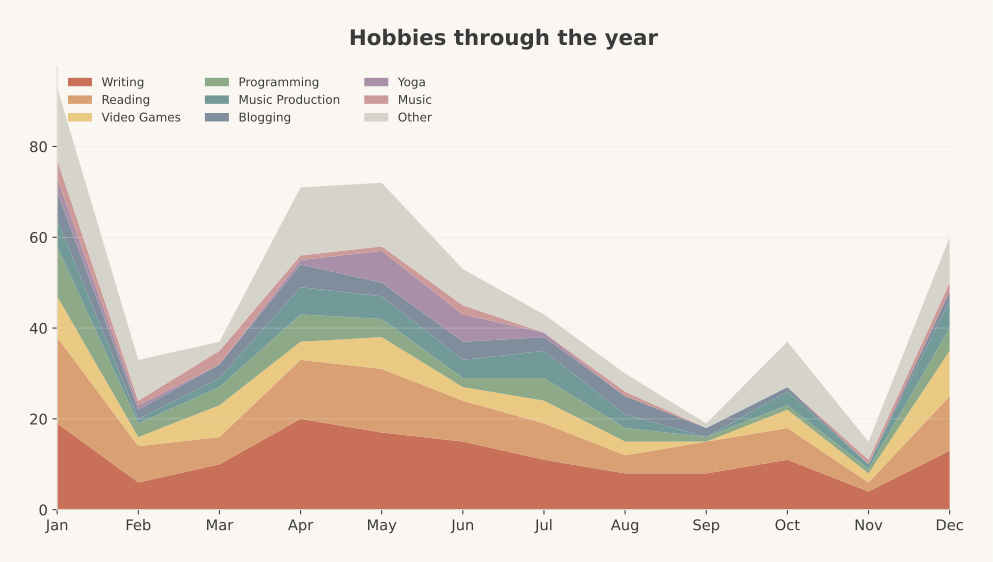
Here’s how I divided time between my hobbies through the year:
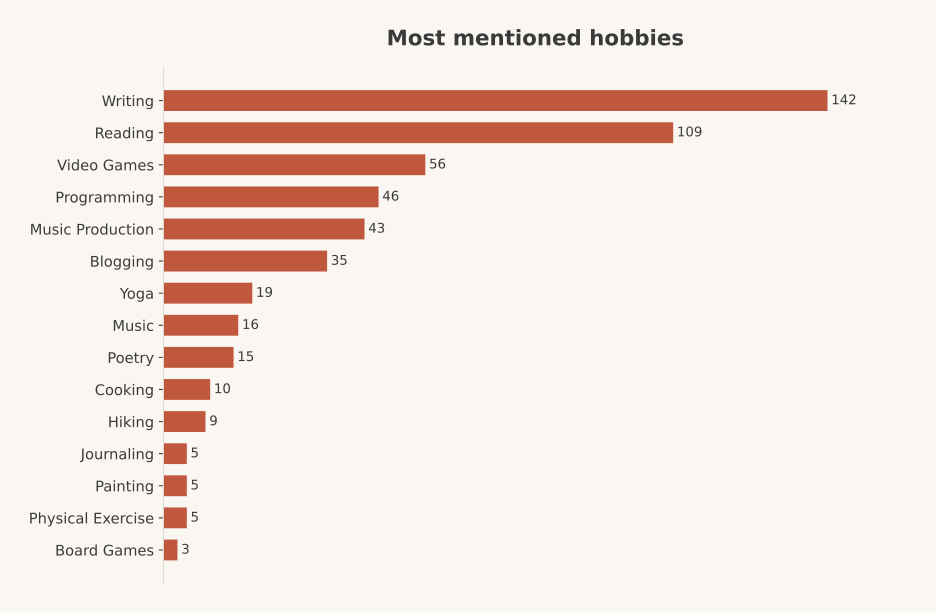
Here are my most mentioned hobbies:
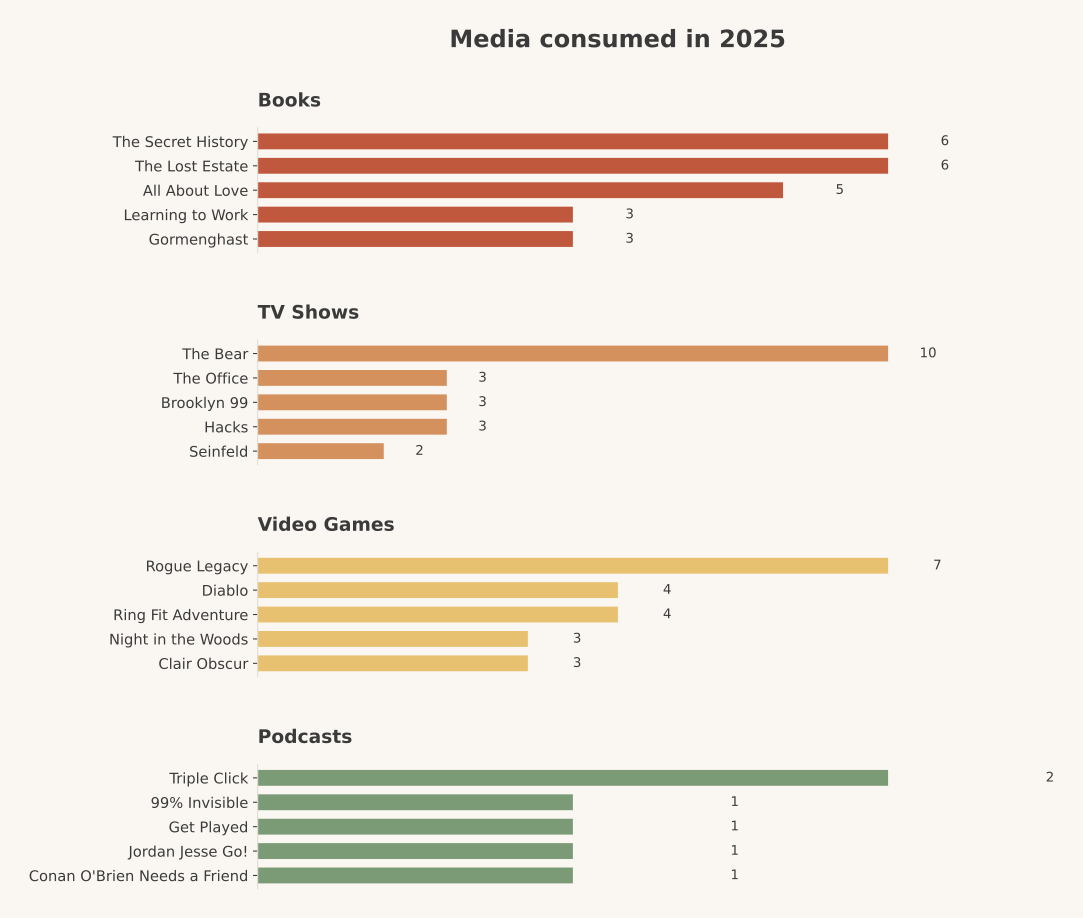
This one is media I engaged with. There isn’t a lot of data for this one:
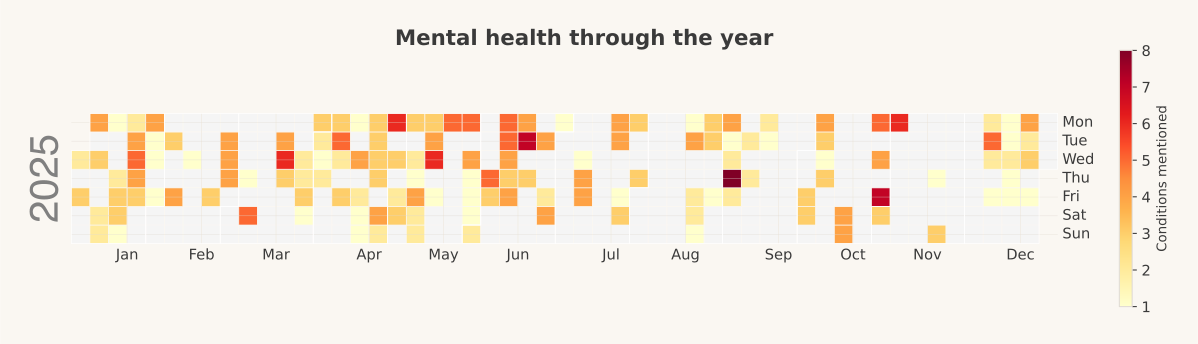
How many mental health issues I complained about each day across the year:
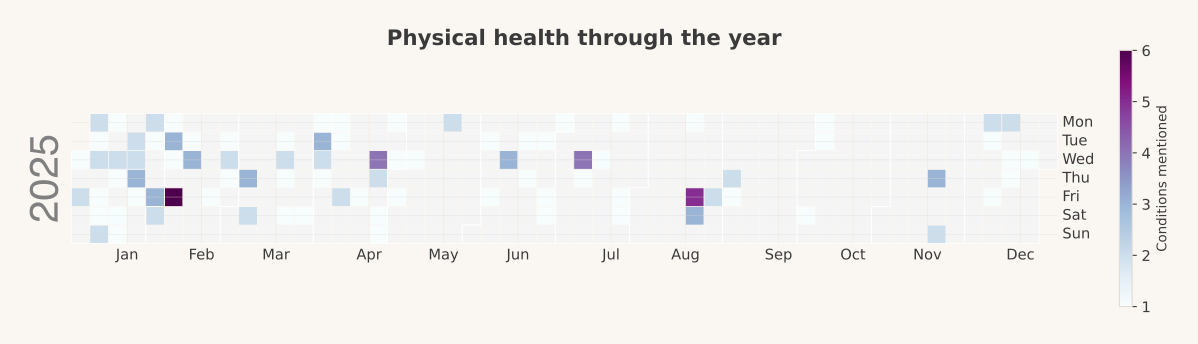
How many physical health issues I complained about each day across the year:
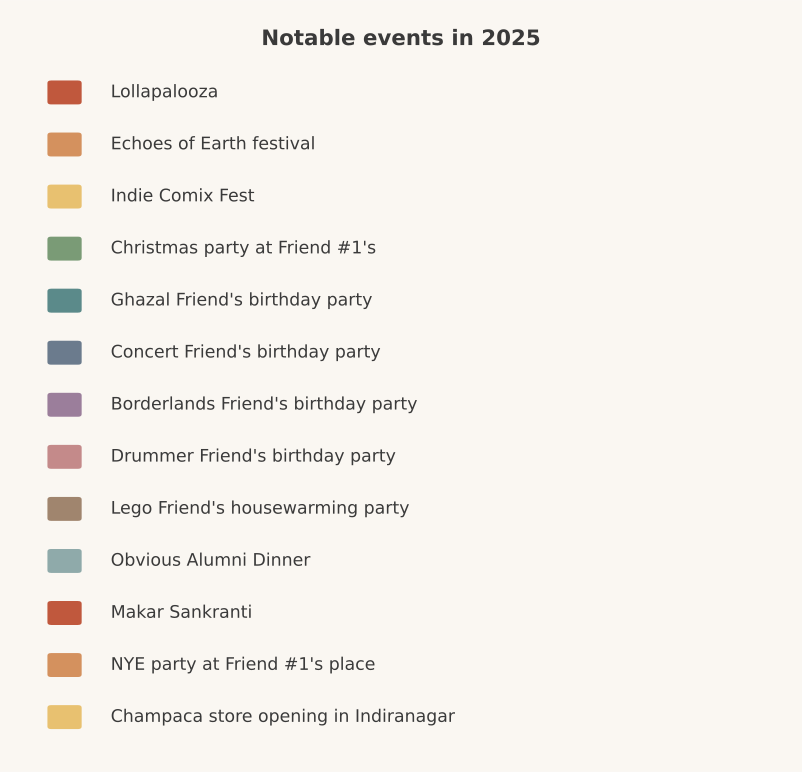
The big events of 2025:
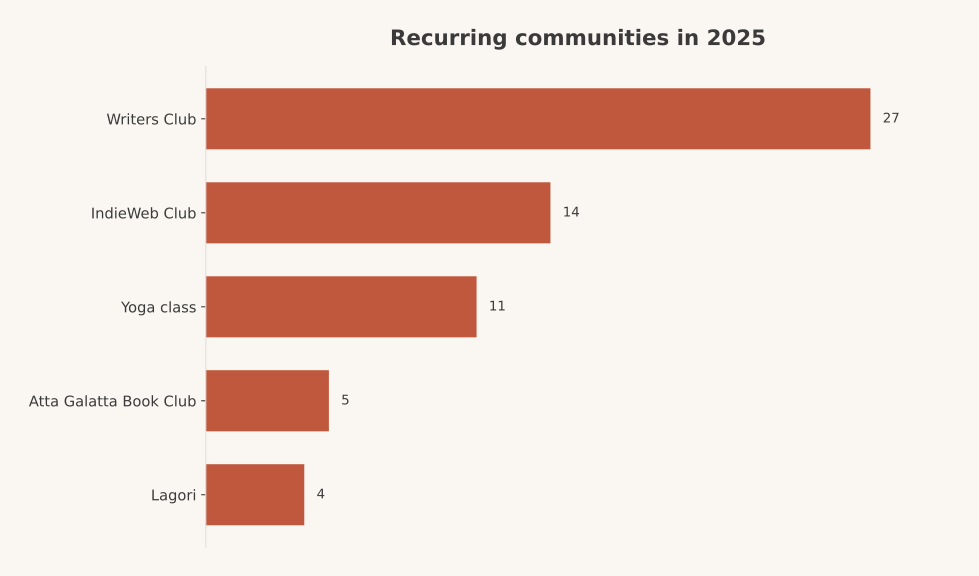
The communities I spent most of my time with:
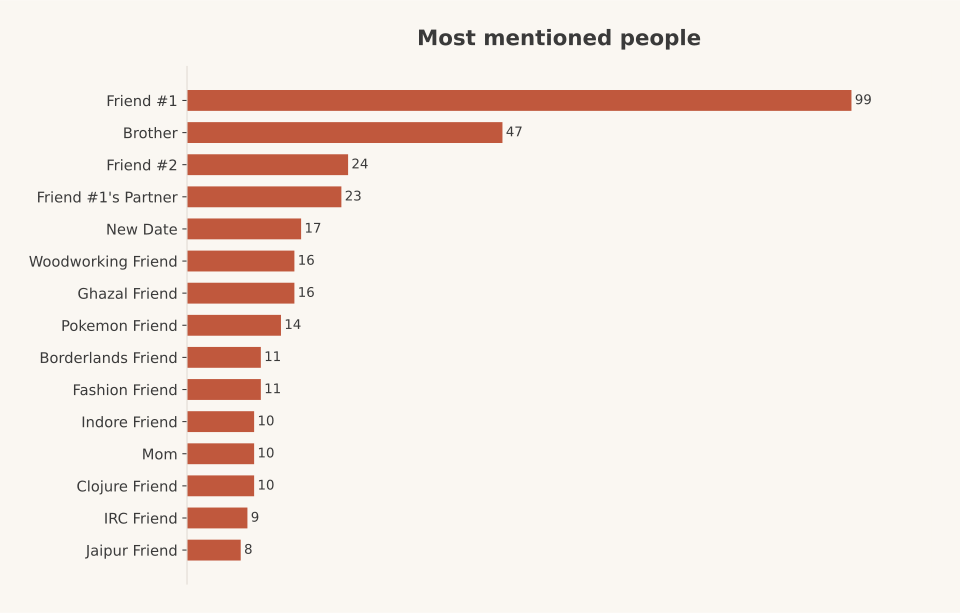
Top mentioned people throughout the year:
Tech stack
I ran all these analyses on my MacBook Pro with an M4 Pro and 48GB RAM. This hardware can just barely manage to run some of the more useful open-weights models, as long as I don’t run anything else.
For running the models, I used Apple’s mlx-lm package.
Picking a model took me longer than putting together the data extraction scripts. People on /r/LocalLlama had a lot of strong opinions, but there was no clear “best” model when I ran this experiment. I just had to try out a bunch of them and evaluate their outputs myself.
If I had more time and faster hardware, I might have looked into building a small-scale LLM eval for this task. But for this scenario, I picked a few popular models, ran them on a subset of my journal entries, and picked one based on vibes.
This project finally gave me an excuse to learn all the technical terms around LLMs. What’s quantization? What does the number of parameters do? What does it mean when a model has instruct, coder, thinking, or A32 in its name? What is a reasoning model? What’s MoE? What are active parameters? This was fun, even if my knowledge will be obsolete in six months.
In the beginning, I ran all my scripts with Qwen 2.5 Instruct 32b at 8-bit quantization as the model. This fit in my RAM with just enough room left over for a browser, text editor, and terminal.
But Qwen 2.5 didn’t produce the best output and hallucinated quite a bit, so I ran my final analyses using Llama-3.3 70B Instruct at 3bit quantization. This could just about fit in my RAM if I quit every other app and increased the amount of GPU RAM a process was allowed to use.
While quickly iterating on my Python code, I used a tiny model: Qwen 3 4b Instruct quantized to 4bits.
Deciding what questions to ask
A major reason this experiment didn’t yield useful insights was that I didn’t know what questions to ask the LLM.
I couldn’t do a qualitative analysis of my writing—the kind of analysis a therapist might be able to do—because I’m not a trained psychologist. Even if I could figure out the right prompts, I wouldn’t want to do this kind of work with an LLM. The potential for harm is too great, and the cost of mistakes is too high.
With a few exceptions, I limited myself to extracting quantitative data only. From each journal entry, I extracted the following information:
- List of things I was grateful for, if any
- List of hobbies or side-projects mentioned
- List of locations mentioned
- List of media mentioned (including books, movies, games, or music)
- A boolean answer to whether it was a good or bad day for my mental health
- List of mental health issues mentioned, if any
- A boolean answer to whether it was a good or bad day for my physical health
- List of physical health issues mentioned, if any
- List of things I was proud of, if any
- List of social activities mentioned
- Travel destinations mentioned, if any
- List of friends, family members, or acquaintances mentioned
- List of new people I met that day, if any
None of the models was as accurate as I had hoped at extracting this data. In many cases, I noticed hallucinations and examples from my system prompt leaking into the output, which I had to clean up afterwards. Qwen 2.5 was particularly susceptible to this.
Some of the analyses (e.g. list of new people I met) produced nonsensical results, but that wasn’t really the fault of the models. They were all operating on a single journal entry at a time, so they had no sense of the larger context of my life.
Running the analysis
I couldn’t run all my journal entries through the LLM at once. I didn’t have that kind of RAM and the models didn’t have that kind of context window. I had to run the analysis one journal entry at a time. Even then, my computer choked on some of the larger entries, and I had to write my scripts in a way that I could run partial analyses or continue failed analyses.
Trying to extract all the information listed above in one pass produced low-quality output. I had to split my analysis into multiple prompts and run them one at a time.
Surprisingly, none of the models I tried had an issue with the instruction produce only valid JSON, produce no other output. Even the really tiny models had no problems following the instruction. Some of them occasionally threw in a Markdown fenced code block, but it was easy enough to strip using a regex.
My prompts were divided into two parts:
- A “core” prompt that was common across analyses
- Task-specific prompts for each analysis
The task-specific prompts included detailed instructions and examples that made the structure of the JSON output clear. Every model followed the JSON schema mentioned in the prompt, and I rarely ever ran into JSON parsing issues.
But the one issue I never managed to fix was the examples from the prompts leaking into the extracted output. Every model insisted that I had “dinner with Sarah” several times last year, even though I don’t know anybody by that name. This name came from an example that formed part of one of my prompts. I just had to make sure the examples I used stood out—e.g., using names of people I didn’t know at all or movies I hadn’t watched—so I could filter them out using plain old Python code afterwards.
Here’s what my core prompt looked like:
The user wants to reflect on all the notable events that happened to them in the year 2025. They have maintained a detailed journal that chronicles their life. Your job is to summarize and curate the text of their journal in order to surface the most important events.

You will be given a single journal entry wrapped in `<journal_entry>` tags along with further instructions. The instructions will ask you to extract some data from this entry. Only extract the information that is requested from you. Do not include any other text in your response. Only return valid JSON.

Further instructions follow.
To this core prompt, I appended task-specific prompts. Here’s the prompt for extracting health issues mentioned in an entry:
Extract physical health information **experienced by the author** in this journal entry.

1. Focus on the author: do not extract health issues relating to other people (friends, family, partners) mentioned in the text.
2. Symptoms & conditions: extract specific physical symptoms (e.g., "Sore throat", "Migraine", "Back pain") or diagnosed conditions (e.g., "Flu", "Covid"). Normalize informal descriptions to standard terms where possible (e.g., "my tummy hurts" -> "Stomach ache").
3. Exclusions:
   - Do not include general fleeting states like "tired", "hungry" unless they are described as severe (e.g. "Exhaustion").
   - Do not include physical activities (e.g., "went for a run") unless they resulted in an injury or pain.
   - Do not include purely mental health issues (e.g. "Anxiety", "Depression"), though physical symptoms of them (e.g. "Panic attack symptoms" like racing heart) can be included if explicitly physical.

## JSON structure

Return a single JSON object with this exact key:

- `physical_health_issues`: Array of strings (e.g., ["Back pain", "Stomach ache"]).

If no relevant issues are found, return an empty array.

## Example output

### Example 1: Issues found

```json
{
  "physical_health_issues": ["Sore throat", "Headache"]
}
```

### Example 2: No issues found

```json
{
  "physical_health_issues": []
}
```
You can find all the prompts in the GitHub repository.
The collected output from all the entries looked something like this:
{
  "physical_sick_days": [
    "2025-01-01.md",
    "2025-01-03.md",
    "2025-01-06.md",
    "2025-01-07.md",
    "2025-01-08.md",
    "2025-01-10.md",
    "2025-01-11.md",
    "2025-01-12.md",
    "2025-01-13.md",
    ...
  ],
  "physical_sickness_map": {
    "Allergies": [
      "2025-03-19.md"
    ],
    "Allergy": [
      "2025-04-08.md"
    ],
    "Anxiety": [
      "2025-04-02.md",
      "2025-08-23.md"
    ],
    "Back pain": [
      "2025-01-15.md",
      "2025-07-25.md"
    ],
    "Body feeling tired": [
      "2025-08-22.md"
    ],
    "Brain feeling tired": [
      "2025-08-22.md"
    ],
    "Brain fog": [
      "2025-02-07.md"
    ],
    "Burning eyes": [
      "2025-11-20.md"
    ],
    "Cat bite on the face": [
      "2025-04-24.md"
    ],
    "Chronic sinus issue": [
      "2025-08-22.md"
    ],
    "Clogged nose": [
      "2025-02-04.md"
    ],
    ...
  }
}
Dealing with synonyms
Since my model could only look at one journal entry at a time, it would sometimes refer to the same health issue, gratitude item, location, or travel destination using different synonyms. For example, “exhaustion” and “fatigue” should refer to the same health issue, but they would appear in the output as two different issues.
My first attempt at de-duplicating these synonyms was to keep a running tally of unique terms discovered during each analysis and append them to the end of the prompt for each subsequent entry. Something like this:
Below is a list of health issues already identified from previous entries. If the journal entry mentions something that is synonymous with or closely equivalent to an existing term, use the EXISTING term exactly. Only create a new term if nothing in the list is a reasonable match.

- Exhaustion
- Headache
- Heartburn
But this quickly led to some really strange hallucinations. I still don’t understand why. This list of terms wasn’t even that long, maybe 15-20 unique terms for each analysis.
My second attempt at solving this was a separate normalization pass for each analysis. After an analysis finished running, I extracted a unique list of terms from its output file and collected them into a prompt. Then asked the LLM to produce a mapping to de-duplicate the terms. This is what the prompt looked like:
You are an expert data analyst assisting with the summarization of a personal journal.

You will be provided with a list of physical health-related terms (symptoms, illnesses, injuries) that were extracted from various journal entries.

Because the extraction was done entry-by-entry, there are inconsistent naming conventions (e.g., "tired" vs "tiredness", "cold" vs "flu-like symptoms"). Your task is to normalize these terms into a cleaner, consolidated set of categories.

# Instructions

1. **Analyze the input list:** Look for terms that represent the same underlying issue or very closely related issues.
2. **Determine canonical names:** For each group of synonyms/variants, choose the most descriptive and concise canonical name. (e.g., map "tired", "exhausted", "fatigue" -> "Fatigue").
3. **Map every term:** Every term in the input list MUST appear as a key in your output map. If a term is already good, map it to itself (or a capitalized version of itself).
4. **Output format:** Return a JSON object where keys are the *original terms* from the input list, and values are the *canonical terms*.

# Example

Input:

```json
["headache", "migraine", "bad headache", "tired", "exhaustion", "sore throat"]
```

Output:

```json
{
  "headache": "Headache",
  "migraine": "Migraine",
  "bad headache": "Headache",
  "tired": "Fatigue",
  "exhaustion": "Fatigue",
  "sore throat": "Sore Throat"
}
```

Now, process the following list of terms provided by the user. Return ONLY the JSON object.
There were better ways to do this than using an LLM. But you know what happens when all you have is a hammer? Yep, exactly. The normalization step was inefficient, but it did its job.
This was the last piece of the puzzle. With all the extraction scripts and their normalization passes working correctly, I left my MacBook running the pipeline of scripts all day. I’ve never seen an M-series MacBook get this hot. I was worried that I’d damage my hardware somehow, but it all worked out fine.
Data visualization
There was nothing special about this step. I just decided on a list of visualizations for the data I’d extracted, then asked Claude to write some matplotlib code to generate them for me. Tweak, rinse, repeat until done.
This was underwhelming
I’m underwhelmed by the results of this experiment. I didn’t quite learn anything new or interesting from the output, at least nothing I didn’t already know.
This was only partly because of LLM limitations. I believe I didn’t quite know what questions to ask in the first place. What was I hoping to discover? What kinds of patterns was I looking for? What was the goal of the experiment besides producing pretty graphs? I went into the project with a cool new piece of tech to try out, but skipped the important up-front human-powered thinking work required to extract good insights from data.
I neglected to sit down and design a set of initial questions I wanted to answer and assumptions I wanted to test before writing the code. Just goes to show that no amount of generative AI magic will produce good results unless you can define what success looks like. Maybe this year I’ll learn more about data analysis and visualization and run this experiment again in December to see if I can go any further.
I did learn one thing from all of this: if you have access to state-of-the-art language models and know the right set of questions to ask, you can process your unstructured data to find needles in some truly massive haystacks. This allows you analyze datasets that would take human reviewers months to comb through. A great example is how the NYT monitors hundreds of podcasts every day using LLMs.
For now, I’m putting a pin in this experiment. Let’s try again in December.